RDBMS databases to Data Lake
We help you build scalable ETL/ELT pipelines to ingest RDBMS data into your Data Lake. Supporting AWS Aurora DB, RDS, MySQL, PostgreSQL, Oracle & SQL Server with Snapshot, Incremental, and CDC.
List of RDBMS databases we support for ingestion into your data lake:
- MySQL
- Amazon Aurora
- Amazon RDS
- Google Cloud SQL
- PostgreSQL
- Oracle DB
- MariaDB
- MS SQL Server
- Any other RDBMS
We provide end-to-end implementation of RDBMS to Data Lake ETL/ELT pipelines using batch or stream Spark/Flink/Beam jobs.
Batch Ingestion: RDBMS/OLTP databases can be read via JDBC connections. We implement full or incremental ingestion using checkpoint or bookmarking strategies to track the last read record. These batch jobs can be scheduled based on business requirements using orchestrators like Airflow, Prefect, Dagster, AWS Glue Scheduler, or Step Functions.
Batch Ingestion: RDBMS/OLTP databases can be read via JDBC connections. We implement full or incremental ingestion using checkpoint or bookmarking strategies to track the last read record. These batch jobs can be scheduled based on business requirements using orchestrators like Airflow, Prefect, Dagster, AWS Glue Scheduler, or Step Functions.
Example of incremental batch job for Aurora DB to Data Lake using JDBC connection:
1OLTP/RDBMS DB -> Incremental Read -> Checkpoint -> Spark Batch Job -> Data LakeReal-Time CDC Ingestion: For real-time requirements, we capture changes using database binary logs (MySQL binlog, PostgreSQL WAL). We utilize tools like Debezium, Flink CDC, or Canal to stream these changes into Kafka topics. The data is then consumed and applied to the Data Lake in real-time.
Example of streaming job for Aurora DB to Data Lake using Debezium, Kafka and Spark:
1Aurora DB -> Binlog -> Debezium -> Kafka -> Spark Streaming -> Data LakeHigh level design flow is shown below:
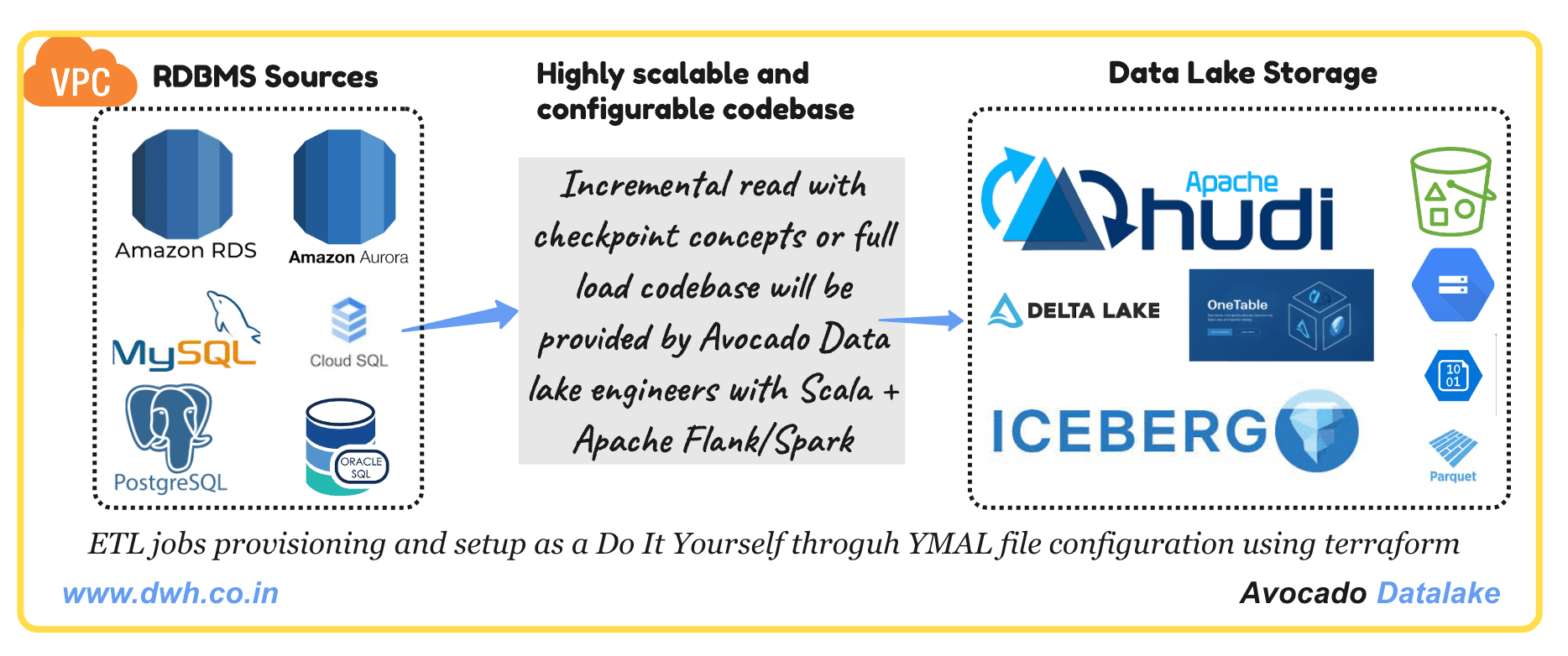
Our RDBMS data lake solutions enable you to seamlessly ingest data from relational databases table (like MySQL, AWS Aurora DB/RDS, Cloud SQL, Oracle database and PostgreSQL) into your data lake in open table format like Delta lake/Apache Iceberg/Apache Hudi with cloud storage such as AWS S3/GCP GCS/Azure Blob storage. This enables you to leverage your existing structured data readily for advanced analytics and machine learning initiatives with heavy workload without connecting to production RDBMS databases.
List of implemented ETL/ELT pipelines
- GCP Cloud SQL databases tables to data lake with Apache Iceberg/Hudi/Delta Lake in GCS
- We provide three types of ingestion:
- Full read and overwrite
- Incremental read and upsert
- Reading binlog using debezium and upsert
- Orchestration using cloud composers
- Job will run on dataproc/dataflow
- Setup of the entire workflow using IaaS Terraform
- All the ingested tables available in the GCP data catalog for end user's access
- Access to data lake tables will be designed based on IAM roles
- We provide three types of ingestion:
The logic described above can be replicated for Aurora, RDS, Cloud SQL, PostgreSQL, MySQL, Oracle, and other RDBMS databases.
For Change Data Capture (CDC) based ingestion, we use Debezium, Flink CDC, or Canal to capture real-time changes from binlogs and push them to Kafka for downstream processing.
For Change Data Capture (CDC) based ingestion, we use Debezium, Flink CDC, or Canal to capture real-time changes from binlogs and push them to Kafka for downstream processing.
Example of streaming job for Aurora DB to Data Lake using Debezium, Kafka and Spark:
1Aurora DB -> Binlog -> Debezium -> Kafka -> Spark Streaming -> Data LakeAll of the above pipelines can be orchestrated using Airflow, Prefect, or Dagster. On AWS, orchestration can be managed via the AWS Glue scheduler or Step Functions with EventBridge. Using AWS Glue, we can build ETL/ELT pipelines with Python + PySpark or Scala + Spark. These are easily configurable for ingesting multiple tables from Aurora, RDS, Cloud SQL, PostgreSQL, MySQL, or Oracle into a Data Lake. While writing to S3, we can enable the AWS Glue Data Catalog so that ingested data is available for querying via AWS Athena, AWS EMR (using Spark SQL or Trino), or any SQL-based application. All data is stored in open table formats such as Apache Iceberg, Apache Hudi, or Delta Lake.
List of the products we offer as an ingestion service or ETL pipelines with other sources like semi-structured and unstructured data sources




