Getting Started with GCP Iceberg Lakehouse (Scala / SBT)
Modern cloud-native data architectures leverage open table formats to achieve ACID transactions, time travel, and schema evolution. In this guide, we walk through setting up a Scala SBT project to compile and run Apache Spark + Apache Iceberg jobs on Google Cloud Dataproc Serverless against the BigLake Iceberg REST catalog.
The Technology Stack
Below are the component versions configured for this implementation, aligning with Google Cloud Dataproc Serverless runtime compatibility.
| Component | Version |
|---|---|
| Scala | 2.13.14 |
| Apache Spark | 3.5.4 |
| Apache Iceberg | 1.9.1 |
| Dataproc Serverless | v2.2 |
| SBT | 1.10.7 |
Dependency Strategy & SBT Build
When running Spark jobs in serverless cloud environments like Dataproc, handling dependencies correctly is critical to avoid classpath conflicts. Spark and Iceberg are declared as
provided in our build.sbt:- At compile & test time: SBT resolves and downloads them normally so your IDE, autocomplete, and local tests work out of the box.
- In the assembled JAR: They are excluded. Dataproc Serverless v2.2 pre-installs Spark 3.5, and Iceberg runtime JARs are provided via the
--jarssubmission argument. This ensures the output JAR remains minimal (fat JAR containing only application code).
SBT Build definition (
build.sbt):1// build.sbt
2ThisBuild / organization := "com.avocado"
3ThisBuild / version := "0.1.0"
4ThisBuild / scalaVersion := "2.13.14"
5
6lazy val root = (project in file("."))
7 .settings(
8 name := "gcp-iceberg-lakehouse",
9
10 // Dependencies
11 libraryDependencies ++= Seq(
12 // --- Apache Spark (provided: Dataproc Serverless v2.2 ships Spark 3.5) ---
13 "org.apache.spark" %% "spark-core" % "3.5.4" % "provided",
14 "org.apache.spark" %% "spark-sql" % "3.5.4" % "provided",
15
16 // --- Apache Iceberg (provided: supplied at submit time via --jars) ---
17 "org.apache.iceberg" % "iceberg-spark-runtime-3.5_2.13" % "1.9.1" % "provided",
18 "org.apache.iceberg" % "iceberg-gcp-bundle" % "1.9.1" % "provided",
19
20 // --- Test ---
21 "org.scalatest" %% "scalatest" % "3.2.19" % Test
22 ),
23
24 // sbt-assembly: fat JAR configuration
25 assembly / assemblyJarName := s"${name.value}-assembly-${version.value}.jar",
26
27 assembly / assemblyMergeStrategy := {
28 case PathList("META-INF", "MANIFEST.MF") => MergeStrategy.discard
29 case PathList("META-INF", xs @ _*) if xs.exists(f =>
30 f.endsWith(".SF") || f.endsWith(".DSA") || f.endsWith(".RSA"))
31 => MergeStrategy.discard
32 case PathList("META-INF", "services", _*) => MergeStrategy.concat
33 case "reference.conf" => MergeStrategy.concat
34 case PathList("META-INF", _*) => MergeStrategy.discard
35 case _ => MergeStrategy.first
36 },
37
38 // Mark provided scope as excluded from the assembly JAR
39 assembly / assemblyOption := (assembly / assemblyOption).value
40 .withIncludeScala(false),
41
42 scalacOptions ++= Seq(
43 "-encoding", "utf8",
44 "-deprecation",
45 "-feature",
46 "-unchecked",
47 "-Xlint:unused"
48 )
49 )Compile and build commands:
1# Compile the project
2sbt compile
3
4# Run tests
5sbt test
6
7# Produce assembled/fat JAR (app code only — Spark/Iceberg marked provided/excluded)
8sbt assembly
Scala Iceberg Implementation
Our Spark program demonstrates the end-to-end Iceberg lifecycle. Crucially, catalog configurations are not hardcoded. Instead, the Spark session is instantiated dynamically, and the BigLake catalog parameters are injected at runtime via Dataproc command properties.
Scala application entrypoint (
com.avocado.lakehouse.IcebergQuickstart):1package com.avocado.lakehouse
2
3import org.apache.spark.sql.SparkSession
4
5/**
6 * IcebergQuickstart — Scala equivalent of quickstart.py from GCP wiki: https://docs.cloud.google.com/lakehouse/docs/use-lakehouse-metastore-iceberg-rest-catalog
7 *
8 * Demonstrates end-to-end Iceberg table lifecycle on GCP Lakehouse using the
9 * BigLake Iceberg REST catalog:
10 * 1. Create namespace (idempotent)
11 * 2. Create (or replace) an Iceberg table
12 * 3. Insert sample rows
13 * 4. Read back and print results
14 */
15object IcebergQuickstart {
16
17 private val CatalogName = "quickstart_catalog"
18 private val NamespaceName = "quickstart_namespace"
19 private val TableName = "test_table_from_jar"
20 private val FullTableRef = s"`$CatalogName`.$NamespaceName.$TableName"
21
22 def main(args: Array[String]): Unit = {
23 val spark = SparkSession.builder()
24 .appName("iceberg-quickstart")
25 .getOrCreate()
26
27 try {
28 run(spark)
29 } finally {
30 spark.stop()
31 }
32 }
33
34 def run(spark: SparkSession): Unit = {
35 // Step 1: Create namespace (dataset) if it doesn't already exist
36 println(s"[1/4] Creating namespace '$NamespaceName' in catalog '$CatalogName'...")
37 spark.sql(
38 s"CREATE NAMESPACE IF NOT EXISTS `$CatalogName`.$NamespaceName"
39 )
40 println(s" Namespace ready.")
41
42 // Step 2: Create (or replace) the Iceberg table
43 println(s"[2/4] Creating table $FullTableRef ...")
44 spark.sql(
45 s"""CREATE OR REPLACE TABLE $FullTableRef (
46 | id INT,
47 | name STRING
48 |) USING iceberg
49 |""".stripMargin
50 )
51 println(s" Table created.")
52
53 // Step 3: Insert sample data
54 println(s"[3/4] Inserting rows into $FullTableRef ...")
55 spark.sql(
56 s"""INSERT INTO $FullTableRef
57 |VALUES (1, 'one'), (2, 'two'), (3, 'three')
58 |""".stripMargin
59 )
60 println(s" Rows inserted.")
61
62 // Step 4: Read back and print results
63 println(s"[4/4] Reading back rows from $FullTableRef ...")
64 val df = spark.sql(s"SELECT * FROM $FullTableRef ORDER BY id")
65 df.show(truncate = false)
66 println(s" Total rows: ${df.count()}")
67 }
68}Submitting to Dataproc Serverless
To run the Spark code in your GCP environment, the script compiles the Scala code into a fat JAR using SBT, uploads it to Google Cloud Storage (GCS), and submits the batch job. In the submit arguments, we reference the Maven coordinates of the Apache Iceberg dependencies and pass BigLake Iceberg REST Catalog settings (e.g. uri, OAuth credentials endpoint, warehouse storage path).
This is a just an example to show case of this script, it can be submitted from the any orchestrating tools like Airflow, Prefect, Dagster, etc.
GCP Submit Script (
scripts/submit_quickstart.sh):1#!/bin/bash
2# submit_quickstart.sh
3set -euo pipefail
4
5# Configuration — adjust these values to match your GCP environment
6REGION="*Your-Region*"
7PROJECT_ID="*Your-Project-ID*"
8LAKEHOUSE_CATALOG_ID="*Your-Catalog-ID*"
9
10# GCS bucket and path for the Scala JAR
11JAR_BUCKET="*Your-Bucket-Name*"
12JAR_PREFIX="scala/jar"
13JAR_VERSION="0.1.0"
14JAR_NAME="gcp-iceberg-lakehouse-assembly-${JAR_VERSION}.jar"
15JAR_LOCAL="target/scala-2.13/${JAR_NAME}"
16JAR_GCS="gs://${JAR_BUCKET}/${JAR_PREFIX}/${JAR_NAME}"
17
18# Iceberg JARs — sourced directly from Maven Central via HTTPS.
19MAVEN_BASE="https://storage-download.googleapis.com/maven-central/maven2/org/apache/iceberg"
20ICEBERG_VERSION="1.9.1"
21ICEBERG_RUNTIME_JAR="${MAVEN_BASE}/iceberg-spark-runtime-3.5_2.12/${ICEBERG_VERSION}/iceberg-spark-runtime-3.5_2.12-${ICEBERG_VERSION}.jar"
22ICEBERG_GCP_BUNDLE_JAR="${MAVEN_BASE}/iceberg-gcp-bundle/${ICEBERG_VERSION}/iceberg-gcp-bundle-${ICEBERG_VERSION}.jar"
23
24# Main class in the JAR
25MAIN_CLASS="com.avocado.lakehouse.IcebergQuickstart"
26
27# 1. Verify local JAR exists
28if [[ ! -f "${JAR_LOCAL}" ]]; then
29 echo "ERROR: JAR not found at ${JAR_LOCAL}. Run 'sbt assembly' first."
30 exit 1
31fi
32
33# 2. Upload JAR to GCS
34echo "[1/2] Uploading JAR to GCS..."
35gcloud storage cp "${JAR_LOCAL}" "${JAR_GCS}"
36
37# 3. Submit Spark batch job to Dataproc Serverless
38echo "[2/2] Submitting Dataproc Serverless batch job..."
39gcloud dataproc batches submit spark \
40 --class="${MAIN_CLASS}" \
41 --jars="${JAR_GCS},${ICEBERG_RUNTIME_JAR},${ICEBERG_GCP_BUNDLE_JAR}" \
42 --project="${PROJECT_ID}" \
43 --region="${REGION}" \
44 --version=2.2 \
45 --properties="\
46spark.sql.defaultCatalog=quickstart_catalog,\
47spark.sql.catalog.quickstart_catalog=org.apache.iceberg.spark.SparkCatalog,\
48spark.sql.catalog.quickstart_catalog.type=rest,\
49spark.sql.catalog.quickstart_catalog.uri=https://biglake.googleapis.com/iceberg/v1/restcatalog,\
50spark.sql.catalog.quickstart_catalog.warehouse=gs://${LAKEHOUSE_CATALOG_ID},\
51spark.sql.catalog.quickstart_catalog.io-impl=org.apache.iceberg.gcp.gcs.GCSFileIO,\
52spark.sql.catalog.quickstart_catalog.header.x-goog-user-project=${PROJECT_ID},\
53spark.sql.catalog.quickstart_catalog.rest.auth.type=org.apache.iceberg.gcp.auth.GoogleAuthManager,\
54spark.sql.extensions=org.apache.iceberg.spark.extensions.IcebergSparkSessionExtensions,\
55spark.sql.catalog.quickstart_catalog.header.X-Iceberg-Access-Delegation=vended-credentials,\
56spark.sql.catalog.quickstart_catalog.gcs.oauth2.refresh-credentials-endpoint=https://oauth2.googleapis.com/token"Submit commands:
1# 1. Build the JAR
2sbt assembly
3
4# 2. Submit Spark job to Dataproc Serverless
5chmod +x scripts/submit_quickstart.sh
6./scripts/submit_quickstart.sh
Once the job executes successfully, the Apache Iceberg table is registered automatically in GCP. You can query the resulting dataset directly from BigQuery using Google Cloud BigLake SQL interface:
1SELECT * FROM `scenic-treat-435221-t1.avocado_lakehouse_catalog.quickstart_namespace.test_table_from_jar`;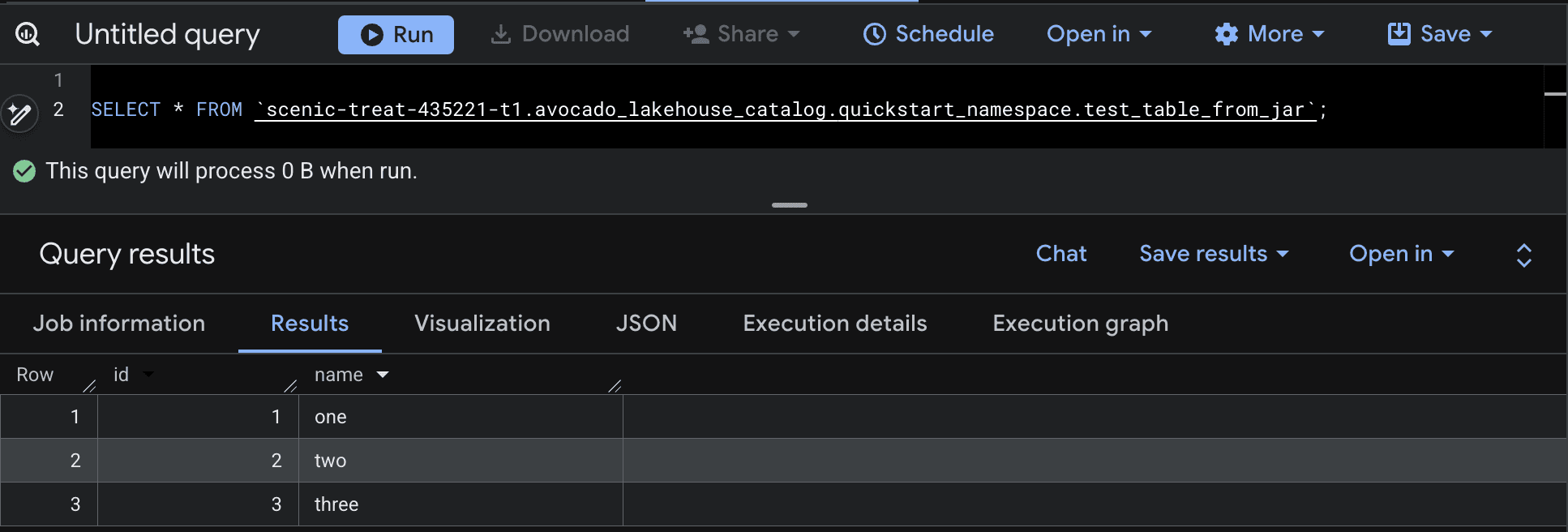
Contact Avocado Datalake for expert data lake implementation and consulting.
Implementing serverless Spark pipelines with BigLake and Apache Iceberg catalog synchronization involves orchestrating GCP credentials, schema configurations, and partition strategies. Our engineers at Avocado Datalake specialize in building, testing, and optimizing cloud-native lakehouses.
We will provide the proper guidance to set up your lakehouse using the terraform as IaaC so the replication will be easier for your organization in future.
Visit our products page for more information and our contact page for a free 30-minute consultation.